

Personalized orders can be some of the most rewarding sales in an Etsy shop. They can also be the easiest orders to get wrong.
One buyer wants a name engraved in a specific font. Another sends a reference image through Messages. A third approves the first proof, then asks for a small change two days later. Meanwhile, every order has its own materials, production time and dispatch date.
If you have been searching for how to manage custom orders on Etsy, the answer is not simply to add more notes. You need a repeatable custom order workflow that shows what each order needs, what is missing, what the buyer has approved and what must happen next.
This guide explains how to build that workflow, which details to track and when a dedicated Etsy custom order manager can save you from expensive mistakes.
▸ WHY ETSY CUSTOM ORDERS BECOME DIFFICULT TO TRACK
A standard ready-to-ship order follows a simple path: receive the order, pack it, add tracking and dispatch it.
A custom order is different because the product may not exist yet. The sale starts a small project with unique requirements, decisions and dependencies. Depending on what you sell, you may need to manage:
• Names, dates, wording and spelling
• Size, color, finish, material or product variations
• Photos, artwork and other reference files
• Missing information from the buyer
• One or more design proofs
• Revision requests and proof versions
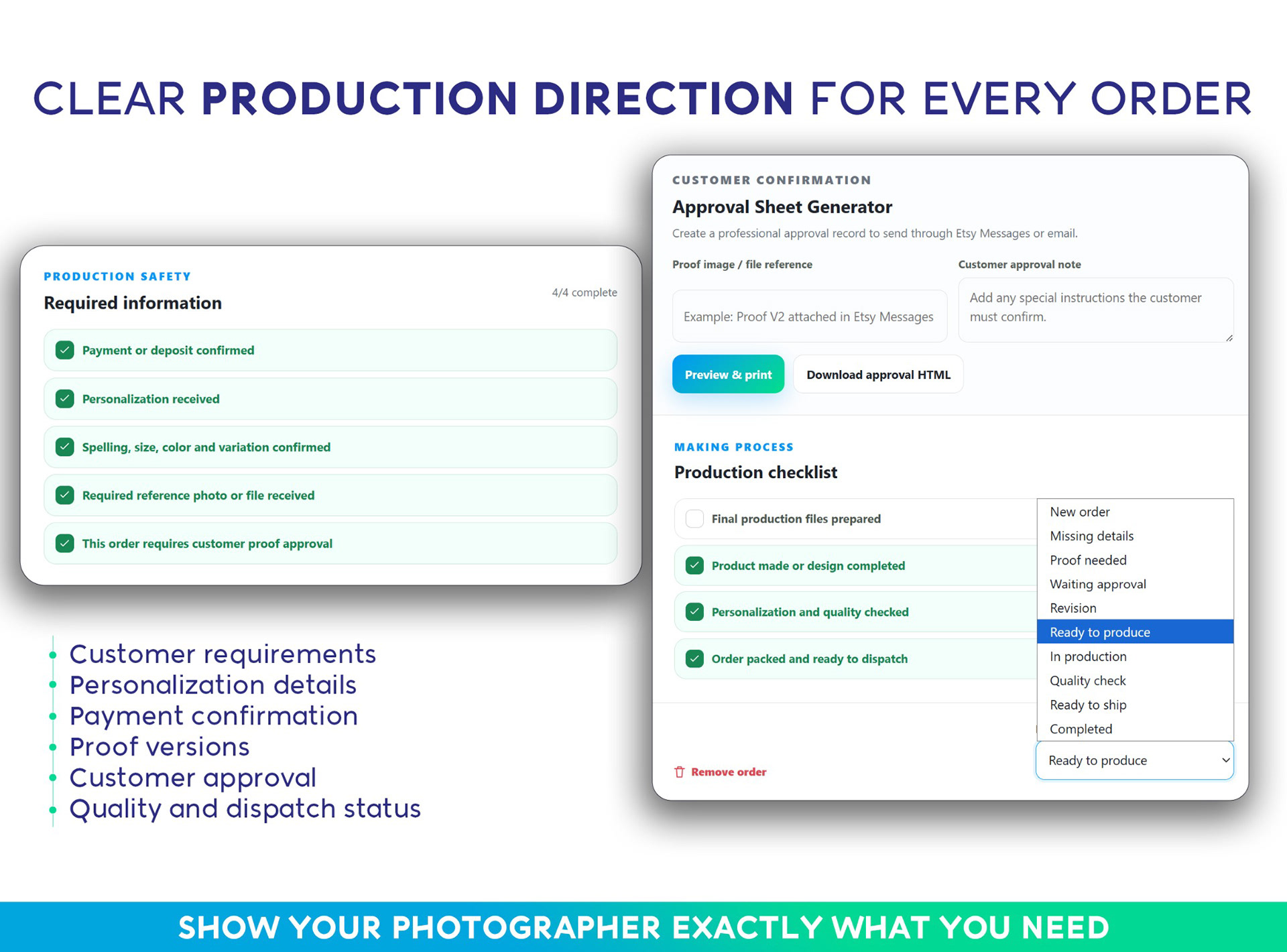
• Clear customer approval before production
• Materials that must be ordered or prepared
• Production tasks and quality checks
• A promised completion or dispatch date
• Materials, fees, labor and estimated profit
Etsy lets sellers collect personalization through custom option fields. Text boxes, lists of choices and buyer file uploads can reduce missing information at checkout. Once the order enters production, however, you still need a practical way to see its status beside all your other work.
Etsy's own guidance for managing custom orders recommends gathering important details at the beginning and checking that each project fits your available time, materials and workload. A production tracker carries that careful planning through the rest of the order.
Custom order management is therefore not only about recording a sale. It is about controlling the production process that begins after the sale.
▸ WHAT EVERY CUSTOM ORDER TRACKER SHOULD HOLD
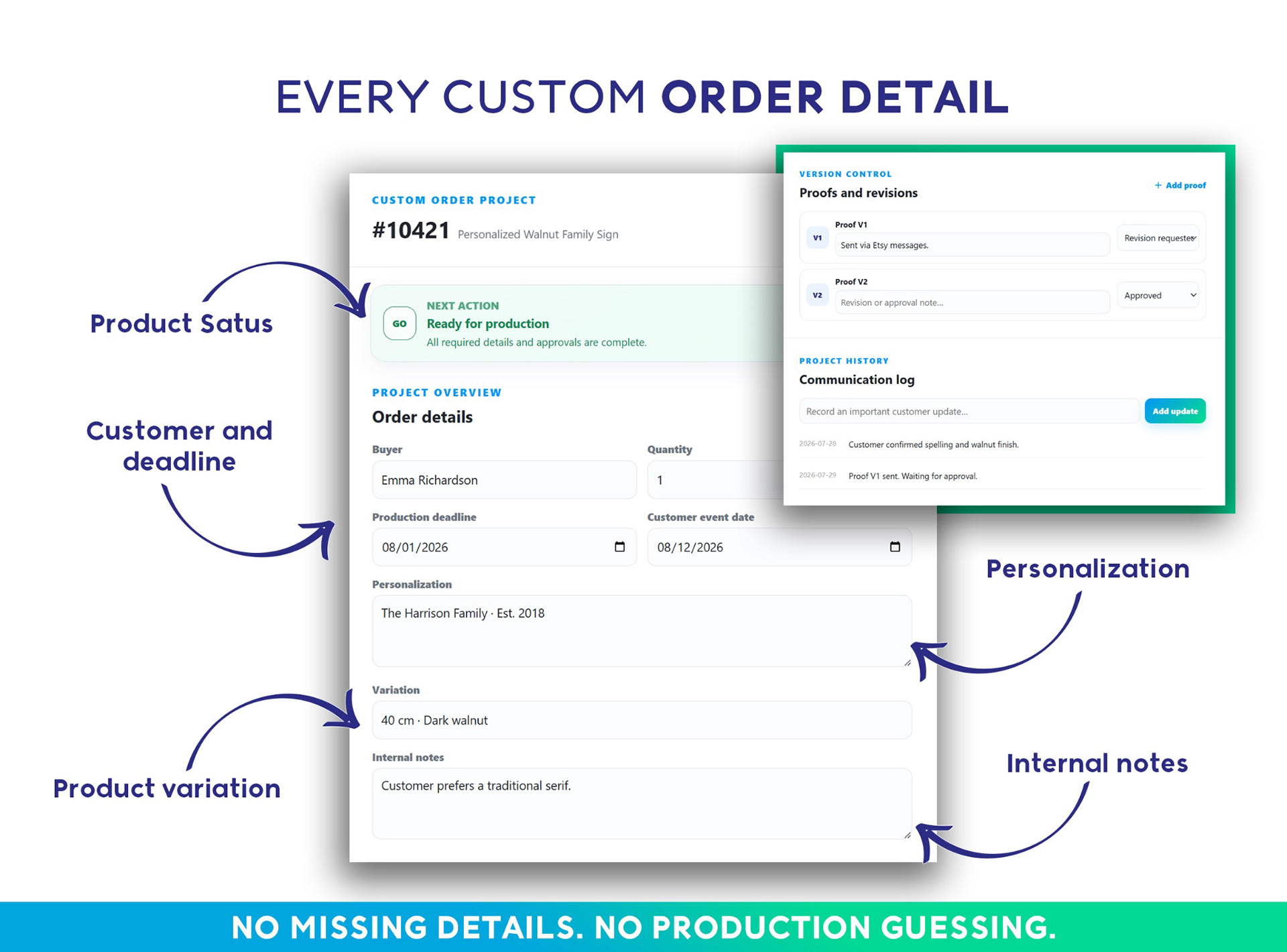
Whether you use paper, a spreadsheet, Notion or an order management app, each order should have one reliable record containing:
• Order number and buyer so the project is easy to identify
• Product and variation to confirm exactly what was purchased
• Personalization including names, dates, wording and spelling
• Reference files so artwork and photos do not disappear inside messages
• Missing details that must be requested before work begins
• Deadline and the production time still required
• Proof versions so the wrong design is never produced
• Approval status showing whether production is authorized
• Production stage and checklist showing the next action
• Materials and labor for estimating profitability
• Packaging and dispatch status for completing the order on time
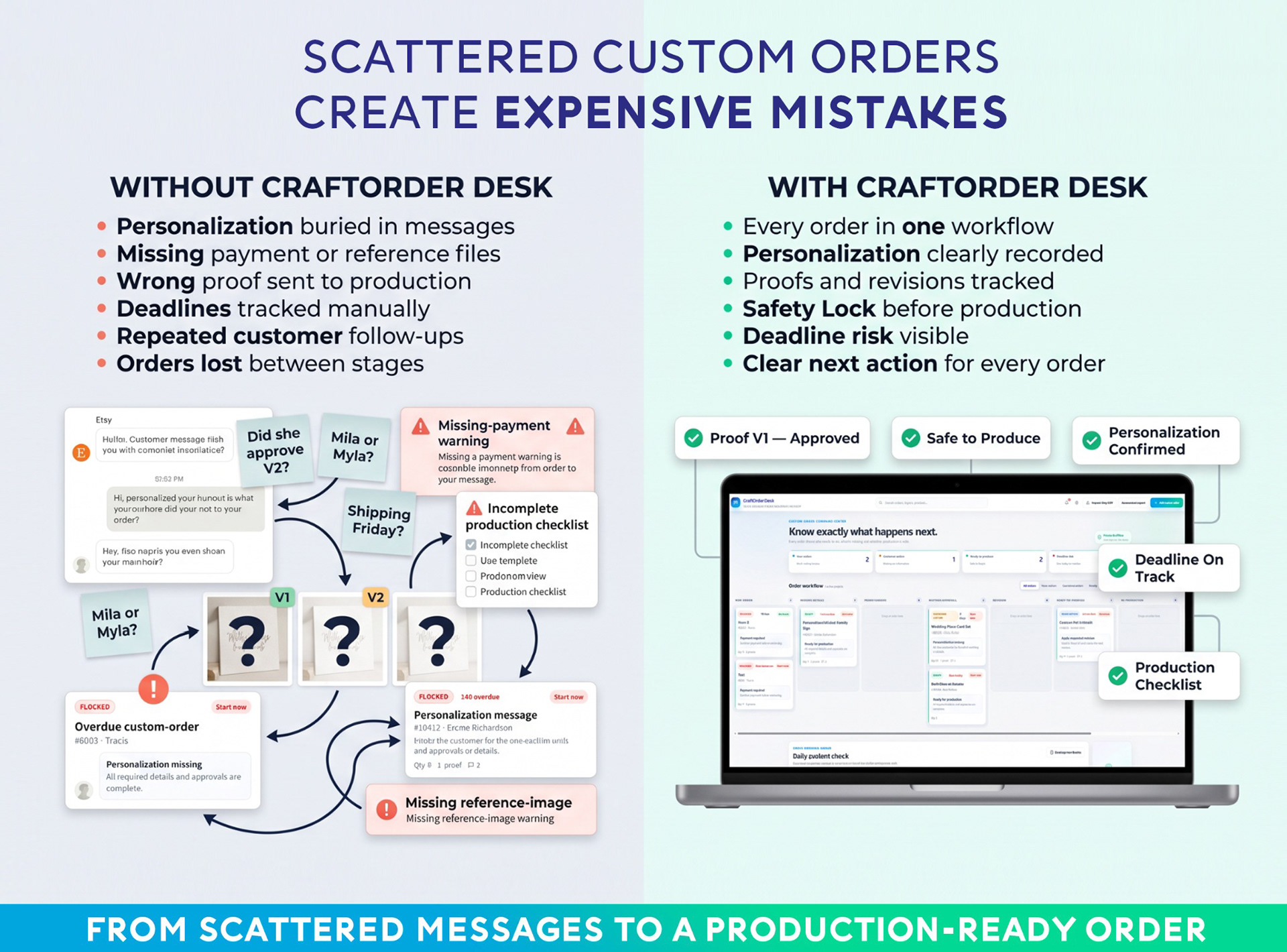
The key is to keep these details together. If the personalization is in the Etsy order, the latest proof is on your desktop, the approval is in Messages and the deadline is on a paper calendar, you do not have one workflow. You have four separate places where something can be missed.
▸ A SIMPLE ETSY CUSTOM ORDER WORKFLOW
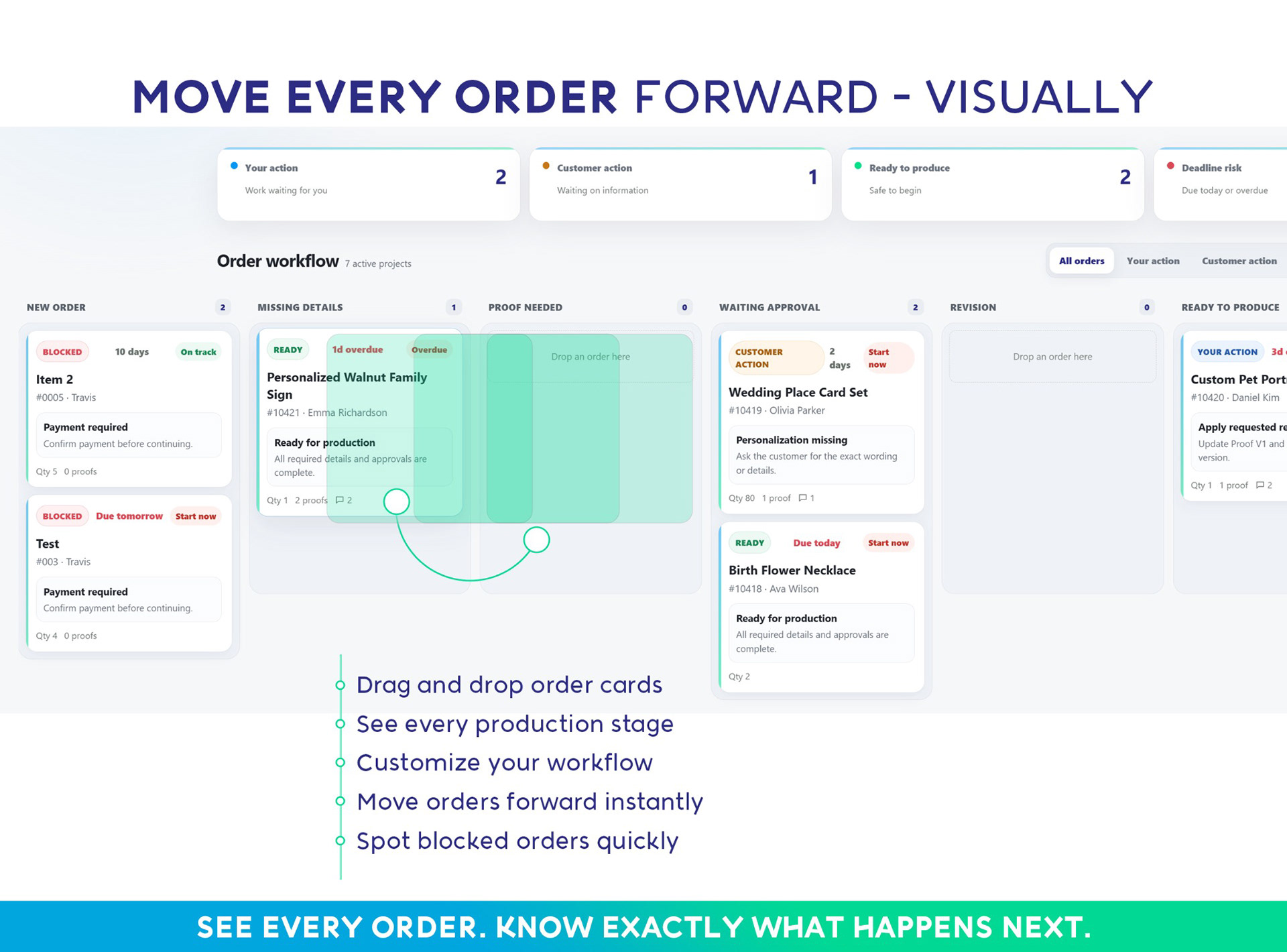
The best workflow is usually the one you can understand in a few seconds. A visual Kanban board works well because each column represents a production stage and every order moves forward as work progresses.
1. NEW ORDER
Create an order record as soon as the sale arrives. Add the order number, buyer, product, variation, personalization and deadline. Do not begin production yet. First check whether the order contains everything you need.
2. WAITING FOR DETAILS
Move the order here if anything is unclear or missing. This might be a font choice, an unreadable photo, an incomplete date, a color that is no longer available or wording that needs confirmation. This stage prevents incomplete orders from quietly entering production.
3. PROOF NEEDED OR PROOF SENT
If your product requires a digital proof, record when it was sent and label every version clearly. A simple file name containing the order number and proof version can prevent confusion. Keep revision notes with the order instead of relying on memory.
4. WAITING FOR APPROVAL
An order waiting for approval is not ready to produce. Treat buyer approval as a separate, visible milestone. Record what the buyer approved, which proof version they approved and when approval was received.
5. READY TO PRODUCE
Only move the order here when all required details are complete, the correct proof is approved and the necessary materials are available. This creates a clean queue of work that can safely enter production.
6. IN PRODUCTION
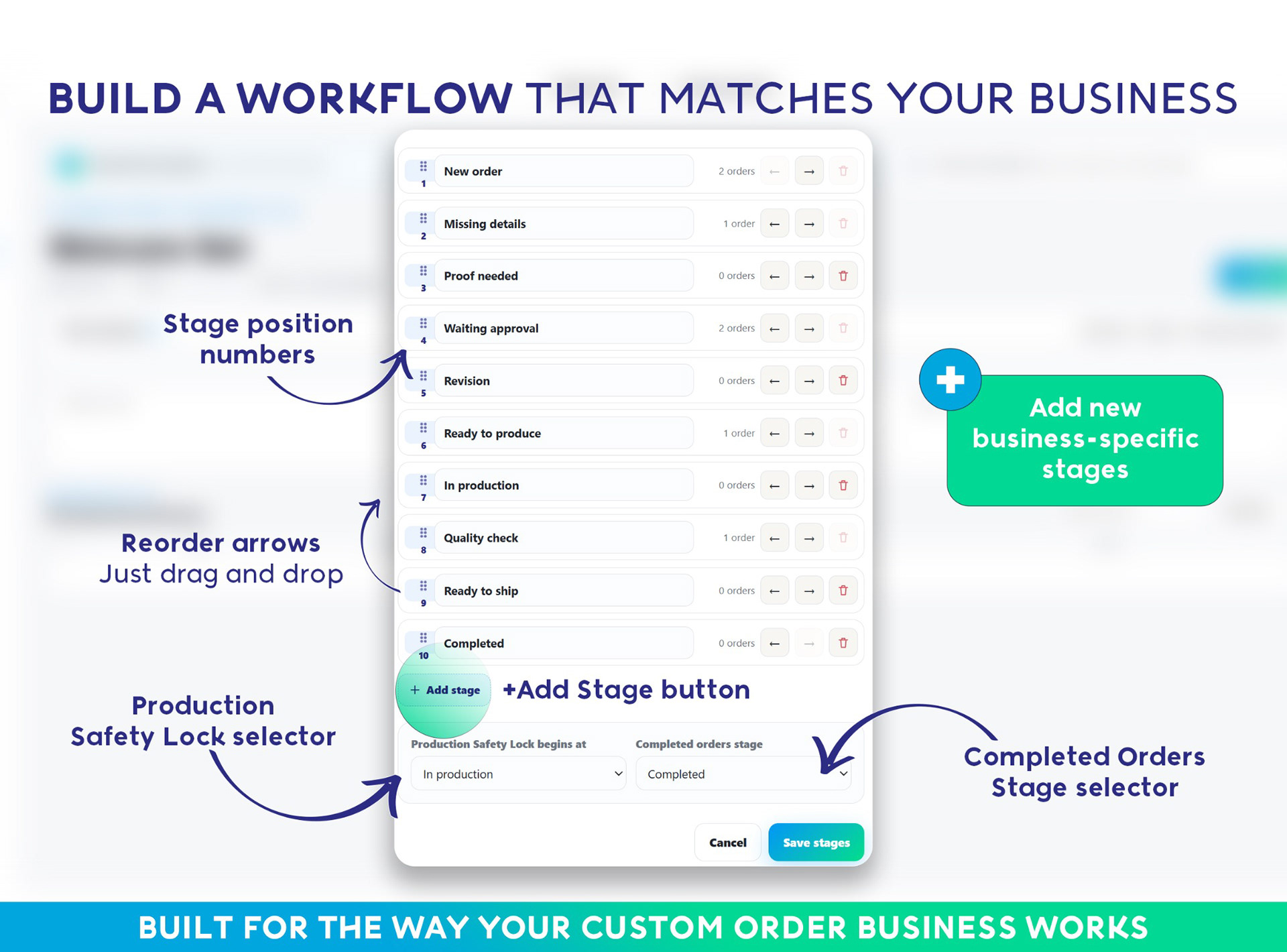
Use a checklist that reflects the way you actually make the item. A laser engraving shop, embroidery business, custom portrait artist and wedding stationery seller will each need different steps. Your workflow should adapt to your business.
7. QUALITY CHECK
Before packaging, compare the finished item with the approved order details. Check spelling, dates, colors, measurements, finish, quantity and packaging requirements. This final comparison is one of the simplest ways to prevent remakes.
8. READY TO SHIP OR DISPATCHED
Record packaging progress and complete the order in Etsy when it is ready. Add tracking when applicable and retain the final order record for reference.
▸ HOW TO TRACK CUSTOMER PROOFS AND APPROVALS
Proof approval is one of the highest-risk parts of a personalized order workflow. The problem is rarely that no proof was sent. The problem is that a revision was requested, a newer version was created and the wrong file was later opened during production.
A safe proof approval process should answer four questions immediately:
1. What is the latest proof version?
2. What changes did the buyer request?
3. Has the buyer approved the final version?
4. Is the order now safe to produce?
Use version numbers consistently and never overwrite older proofs with the same filename. Mark the final approved version clearly. If approval is missing, the order should remain blocked from the production queue.
▸ HOW TO AVOID MISSING ETSY ORDER DEADLINES
A deadline is more than a date on the calendar. It should influence the priority of every order in your production queue.
For each custom order, consider the promised dispatch date, the amount of production time still required, missing buyer information, approval status, material availability and whether revisions have reduced the remaining production window.
An order due next week may already be at risk if it needs three days of production and the buyer has not approved the proof. A useful production tracker should make that risk visible before the deadline is missed.
A simple daily routine can help:
1. Review orders with the nearest deadlines.
2. Identify anything waiting on the buyer.
3. Follow up on proofs or missing details.
4. Confirm which orders are safe to produce.
5. Move finished work into quality check and packaging.
▸ SPREADSHEET, PAPER PLANNER, NOTION OR ORDER MANAGEMENT APP?
There is no single format that suits every handmade business. The right Etsy order tracker depends on your order volume, production process and preferred way of working.
• Etsy order pages can be enough for very small shops with simple fulfillment, but they provide limited visibility into detailed production stages.
• Paper planners work well beside the production table, but they are harder to search, share and back up.
• Spreadsheets are useful for simple order logs and calculations, but proofs, approvals and workflow status can become cumbersome.
• Notion boards provide online access and team collaboration, but require setup and an online workspace.
• Offline order managers offer visual production control without a subscription, but require regular local backups.
The important question is not which format is fashionable. It is whether the system helps you find the correct order information quickly and prevents unfinished or unapproved work from moving forward.
▸ SIGNS YOU HAVE OUTGROWN A BASIC ETSY ORDER SPREADSHEET
You may need a more dedicated handmade business order tracker if:
• You regularly search Etsy Messages for customer details
• You have produced from the wrong proof version
• You keep several spreadsheets, folders or notebooks for the same orders
• You cannot see which customers still need to approve a proof
• You discover deadline problems too late
• You forget to include labor when checking order profitability
• Someone helping with production has to ask what happens next
• You want custom production stages instead of a basic open-or-completed status
These are workflow problems, not personal failures. A busier custom-order business simply creates more information than a basic order list can comfortably display.
▸ A CUSTOM ORDER MANAGER BUILT FOR ETSY SELLERS AND MAKERS
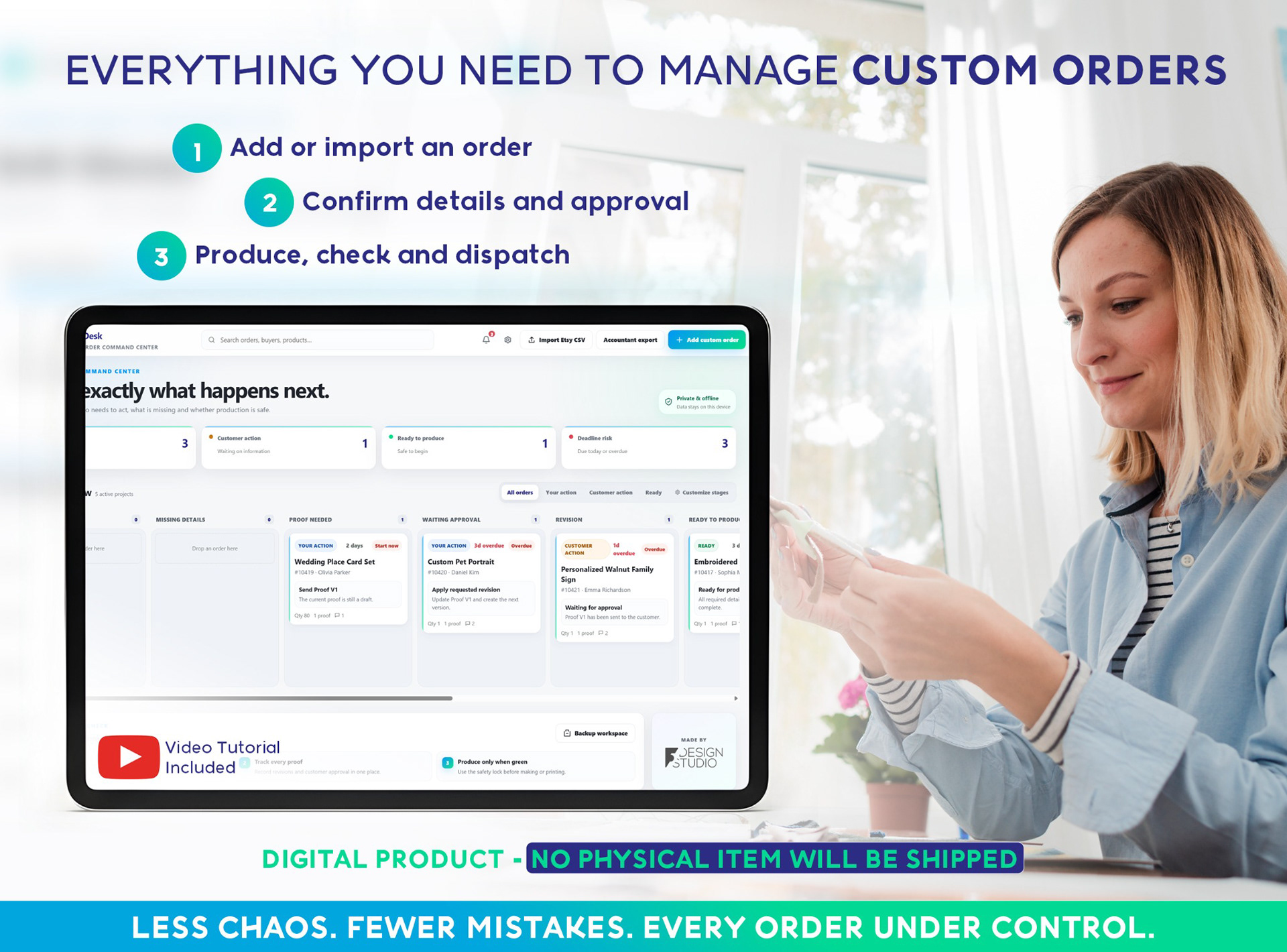
CraftOrder Desk was designed for sellers who make personalized, handmade or made-to-order products. It turns each order into a clear project and lets you move that project through a customizable visual workflow.
The system includes:
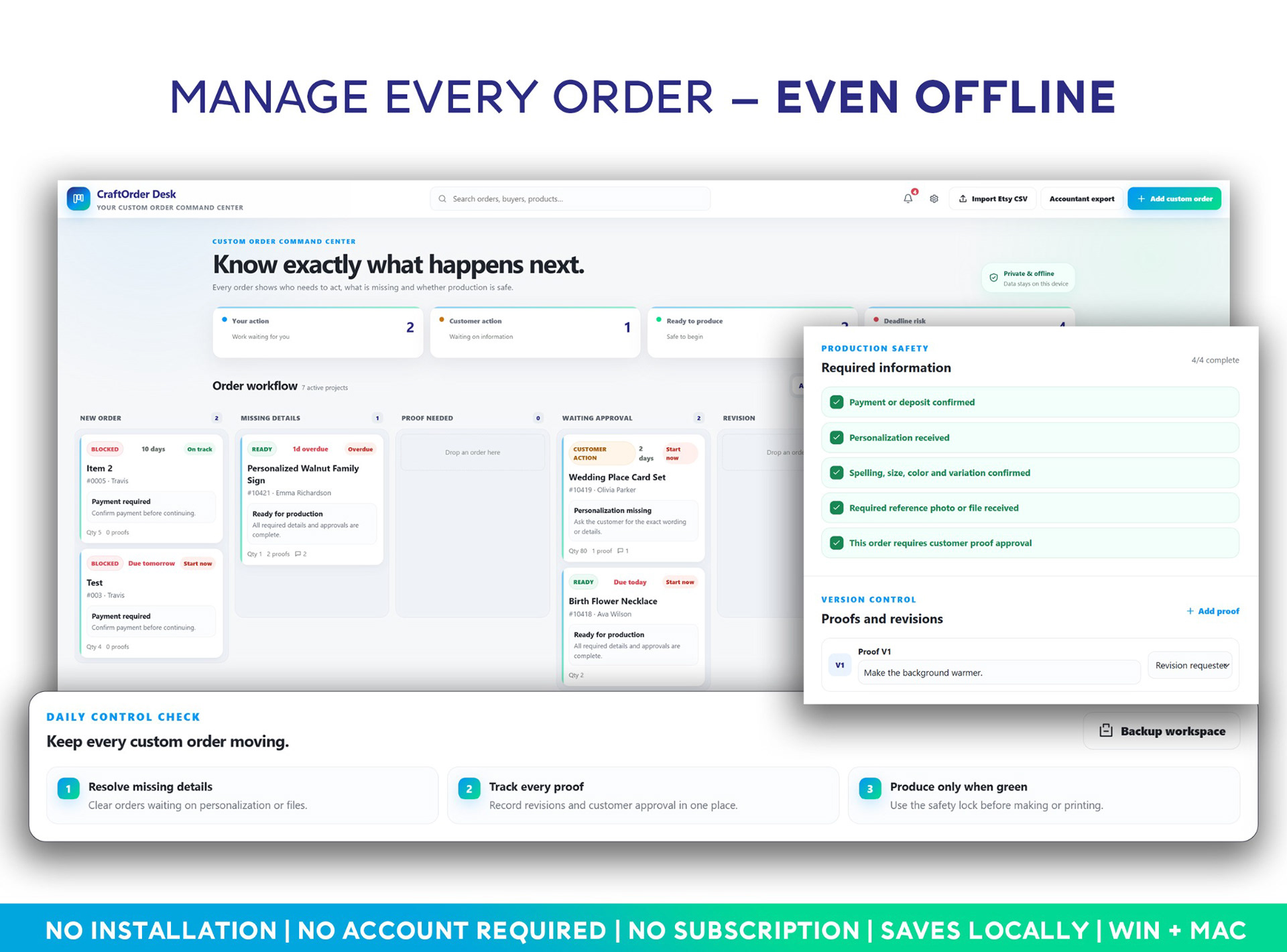
• A drag-and-drop Kanban order board
• Customer, order, personalization and reference-file records
• Custom production stages and checklists
• A Safety Lock for missing information or customer approval
• A Proof Tracker for revisions and final approval
• A Deadline Risk Engine for orders that may run late
• A Customer Approval Sheet Generator
• Materials, fees, labor and estimated-profit tracking
• Etsy CSV import to create multiple records faster
• Accountant export for a cleaner financial summary
• Backup and restore tools
The core HTML app works locally in a modern browser on Windows or Mac. It does not require installation, a CraftOrder Desk account, an internet connection or a monthly subscription. Because its information is stored locally in the browser, regular backups are important.
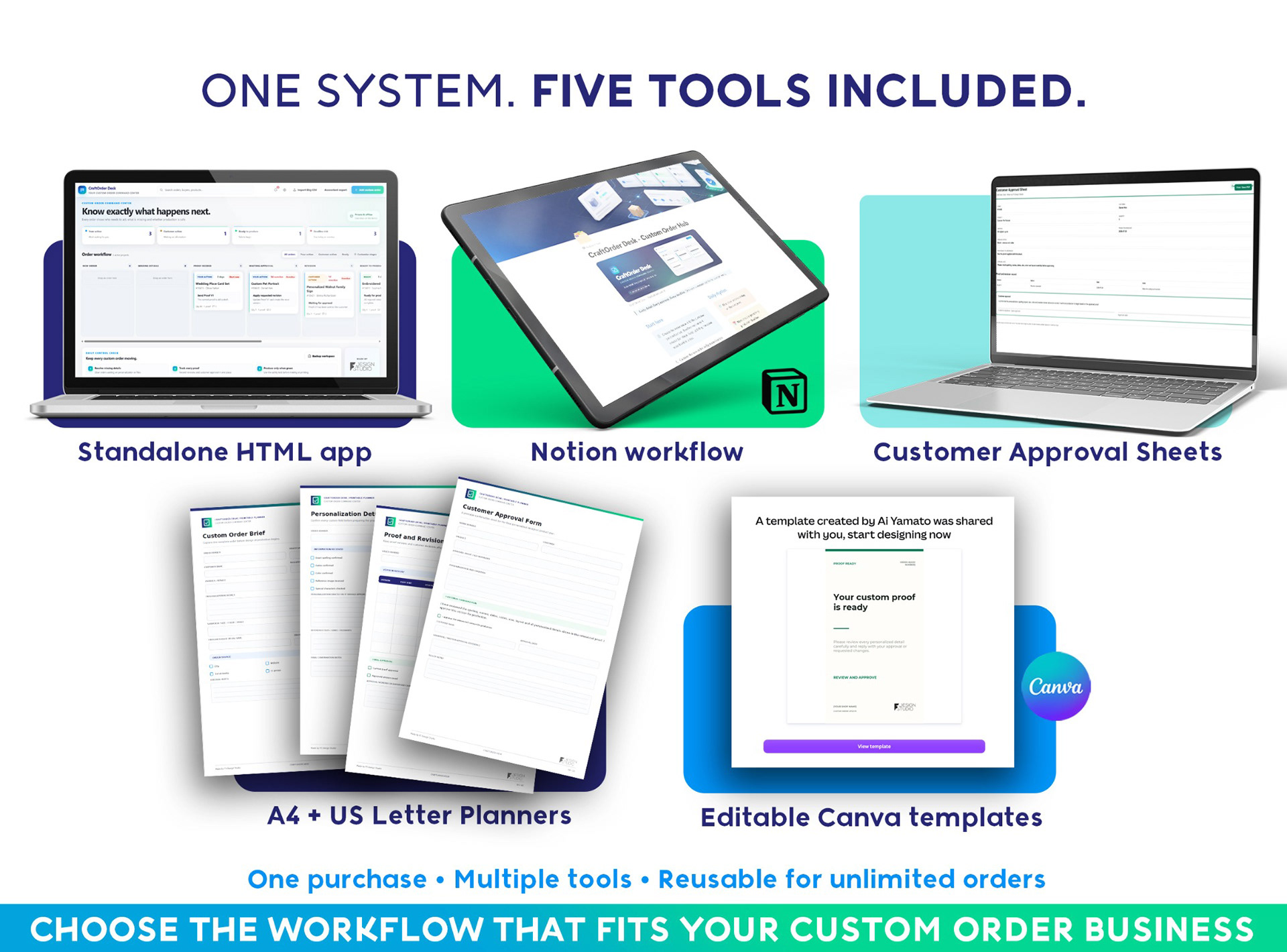
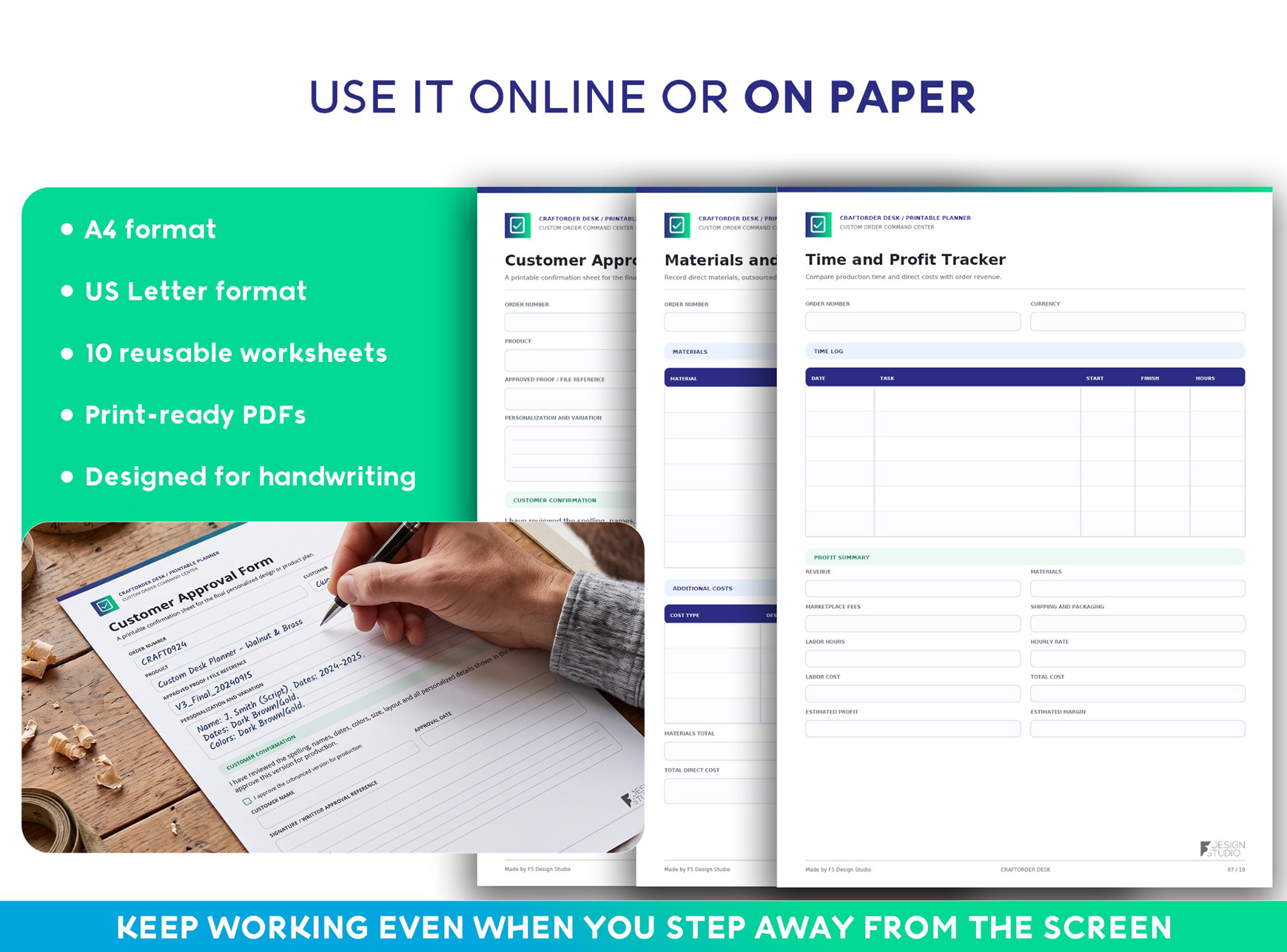
The download also includes a Notion workspace, A4 and US Letter printable worksheets, editable Canva templates, customer approval sheets, an illustrated guide and sample projects.
It is suitable for personalized gift shops, woodworkers, laser engravers, jewelry makers, embroidery and custom apparel businesses, wedding stationery sellers, portrait artists and other small production studios.
▸ BUILD THE SYSTEM BEFORE THE BUSY SEASON
The best time to organize custom orders is before your inbox, proof folder and production table are full.
Start with a simple rule: every order should have one reliable record, one visible status, one current proof and one confirmed deadline. Then build a workflow that stops incomplete work from entering production.
That structure gives you more than a tidy dashboard. It reduces repeated questions, prevents avoidable remakes and helps you make confident decisions about what to work on next.
If your current system is spread across Etsy Messages, spreadsheets, folders and handwritten notes, explore CraftOrder Desk on Etsy and see how a purpose-built custom order workflow can fit your business.
▸ FREQUENTLY ASKED QUESTIONS
HOW DO ETSY SELLERS KEEP TRACK OF CUSTOM ORDERS?
Many sellers begin with Etsy order pages, paper planners or spreadsheets. As order complexity increases, a visual custom order tracker can keep personalization, references, proofs, approvals, deadlines and production stages together in one record.
WHAT SHOULD I TRACK FOR A PERSONALIZED ETSY ORDER?
Track the order number, buyer, product, variation, exact personalization, reference files, missing information, deadline, proof versions, approval status, production stage, checklist, materials, labor, packaging and dispatch status.
HOW CAN I TRACK CUSTOMER APPROVAL FOR AN ETSY ORDER?
Give proof approval its own workflow stage. Record the approved proof version, the approval date and any revision notes. Do not move the order into production until the final version is clearly confirmed.
CAN I USE AN ETSY CSV FILE WITH AN ORDER TRACKER?
Yes, if the tracker supports the relevant Etsy CSV format. CraftOrder Desk includes Etsy CSV import to help create multiple order records faster. Because Etsy may change its export formats, always review imported information before production.
DO I NEED PAID MONTHLY ORDER MANAGEMENT SOFTWARE FOR ETSY?
Not necessarily. Small shops may be comfortable with paper, spreadsheets or Notion. Sellers who want a more structured workflow can also use a standalone offline order manager such as CraftOrder Desk, which has no monthly subscription.
IS CRAFTORDER DESK CONNECTED TO OR ENDORSED BY ETSY?
No. CraftOrder Desk is an independent organizational tool created by F5 Design Studio and is not affiliated with or endorsed by Etsy, Notion or Canva.